What is User Experience (UX)? In simple words, UX is about how a person feels when using a product, website, app, or service. Is it easy to understand? Can I find what I need quickly? Do I feel comfortable using it, or do I want to close the page and leave?
What is User Experience (UX) really about goes beyond colors, buttons, and attractive screens. It covers the complete interaction a person has with a product — before, during, and after using it. ISO describes UX in terms of the user’s perceptions and responses, including emotions, preferences, behaviors, and accomplishments.
If you have ever used an app and thought, “Wow, this is so easy!”, you have experienced good UX.
And if you have ever struggled to find a simple Login, Search, or Checkout button, you have experienced bad UX. 😅
In this guide, I’ll explain what is User Experience (UX), why UX matters, UX vs UI, the main elements of UX design, the UX design process, real-life examples, and how beginners can start learning UX.
Key Highlights
- What is User Experience (UX)? It is the overall experience a person has while interacting with a product, system, or service.
- UX is not just about making a website beautiful.
- Good UX makes products easier, clearer, more useful, and more comfortable to use.
- UX and UI are different, although they work closely together.
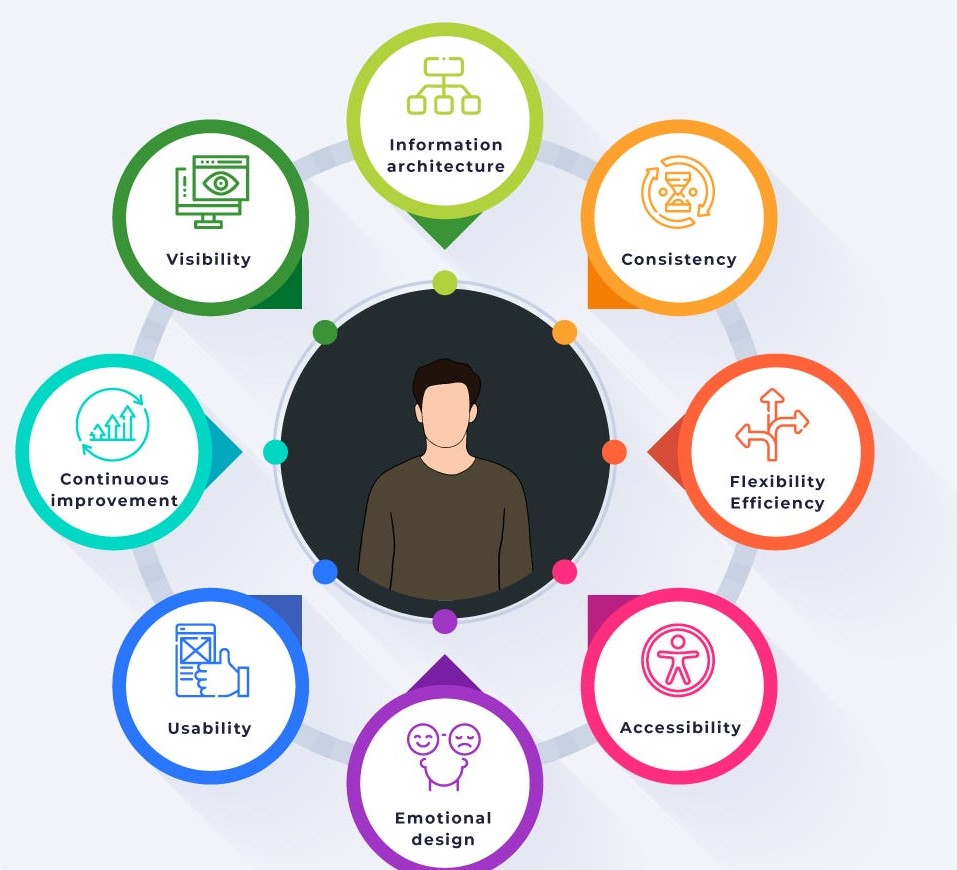
- UX involves user research, information architecture, interaction design, usability, accessibility, content, and testing.
- UX designers try to understand what users actually need instead of simply guessing.
- A good UX process is iterative — designers research, design, test, learn, and improve.
- Accessibility is an important part of creating inclusive experiences.
- UX applies to websites, mobile apps, software, physical products, and services.
What is User Experience (UX)?
Let’s make this really simple.
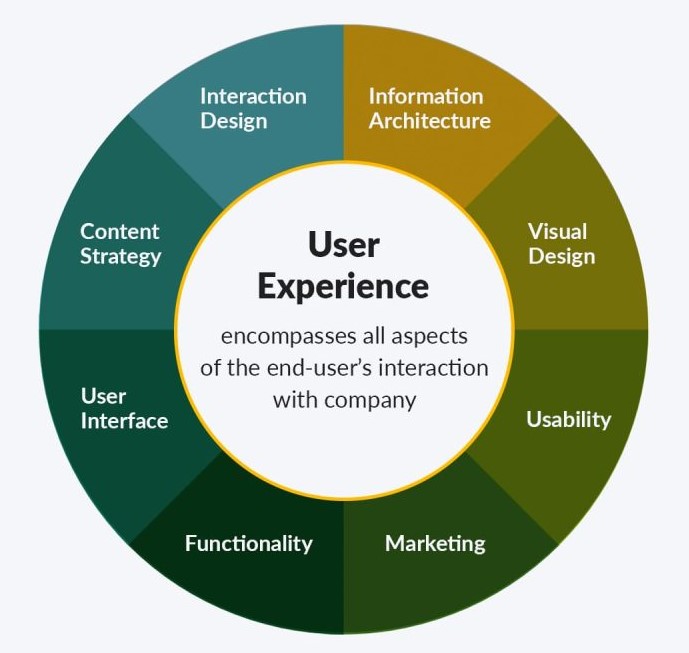
User Experience (UX) is the overall experience a person has when interacting with a product, system, or service.
Imagine that I open a food delivery app because I am hungry.
I want to:
- Open the app.
- Find a restaurant.
- Choose my food.
- Add it to the cart.
- Pay.
- Track the delivery.
If I can complete all these steps without confusion, unnecessary pop-ups, or frustrating errors, the app probably has good UX.
But imagine I have to click five different menus just to find a restaurant. The search button is difficult to locate. The checkout page suddenly asks me for information I don’t understand.
The app may look beautiful.
But the user experience is poor.
This is why UX is much bigger than visual design. Nielsen Norman Group describes UX as covering the different aspects of an end user’s interaction with a company, its products, and its services.
Why is User Experience (UX) Important?
I think the easiest way to understand the importance of UX is to imagine two websites selling exactly the same product.
Website A
- Loads quickly
- Clear navigation
- Simple product information
- Easy search
- Visible prices
- Simple checkout
- Helpful error messages
Website B
- Confusing menu
- Slow pages
- Tiny text
- Too many pop-ups
- Complicated checkout
- Hidden product information
Which website would you prefer?
Probably Website A.
And that’s the point.
A company can have a technically excellent product, but if people cannot understand or use it comfortably, they may simply stop using it.
Good UX can help improve usability, satisfaction, accessibility, efficiency, and confidence. Human-centred design standards also emphasize understanding users, involving them during development, evaluating designs, and improving them iteratively.
Good UX can help businesses:
- Increase customer satisfaction
- Reduce user frustration
- Improve conversion rates
- Reduce support requests
- Encourage people to return
- Make products easier to learn
- Improve accessibility
- Build trust in a brand
So when someone asks, what is User Experience (UX) and why does it matter?, my short answer is:
UX matters because a product isn’t successful simply because it works. People also need to be able to use it comfortably and accomplish what they came to do.
UX vs UI: What is the Difference?
This is probably one of the most common questions beginners ask.
UX and UI are related, but they are not the same thing.
UX — User Experience
UX focuses on the overall experience.
It asks questions like:
- What does the user need?
- What problem are we solving?
- Is the navigation easy?
- Can users complete their tasks?
- Where are users getting confused?
- Is the product accessible?
- How does the user feel during the interaction?
UI — User Interface
UI focuses more on the interface people interact with.
It includes things such as:
- Colors
- Typography
- Buttons
- Icons
- Spacing
- Layout
- Forms
- Visual hierarchy
Here’s an easy example.
Imagine a shopping website.
The UI is what I see — the colors, product cards, buttons, fonts, and page layout.
The UX is the entire journey — finding a product, understanding its details, adding it to the cart, paying, receiving confirmation, and even recovering from an error.
So I like to remember it this way:
UI = how the interface looks and behaves.
UX = how the overall experience works and feels.
A beautiful UI cannot rescue a confusing UX.
Main Elements of User Experience
Now let’s look at what actually goes into UX.
1. User Research
Before designing anything, UX designers need to understand the people who will use the product.
They may conduct:
- Interviews
- Surveys
- User observations
- Usability tests
- Competitor research
- User interviews
- Analytics analysis
For example, if I were designing an online learning platform, I wouldn’t simply assume that every student wants the same thing.
Some students may want short videos.
Others may want detailed notes.
Some may struggle with navigation.
Research helps uncover these differences.
2. User Personas
A user persona is a fictional representation of a particular type of user based on research.
For example:
Name: Priya
Age: 25
Goal: Learn web development
Problem: Gets confused by complicated technical explanations
Needs: Simple lessons, examples, and practice exercises
A persona helps the design team keep the target user in mind.
Instead of saying, “Let’s make this page look good,” we start asking:
“Will Priya understand this page?”
That small change in thinking is powerful.
3. Information Architecture
Information architecture is about organizing information logically.
Think about a website with hundreds of pages.
If everything sits randomly in the menu, users will struggle.
Good information architecture helps users understand:
- Where they are
- Where they can go
- What information belongs together
- How to find something quickly
Menus, categories, labels, navigation systems, and page structures all contribute to this area of UX.
4. Interaction Design
Interaction design focuses on how users interact with the product.
For example:
What happens when I click a button?
What happens when I submit an incorrect password?
What happens when I delete something?
What feedback does the system give me?
A good interaction should feel predictable.
If I click Save, I should know whether my information was actually saved.
If something goes wrong, the system should explain what happened instead of showing a mysterious error message.
5. Usability
Usability asks a very practical question:
Can people use the product effectively, efficiently, and satisfactorily?
ISO’s usability framework focuses on effectiveness, efficiency, and satisfaction in a particular context of use.
For me, usability is one of the easiest UX concepts to understand.
Suppose a website asks me to create an account.
If I immediately understand what information I need to enter, the form is easy to use.
If I have to guess what “Credential Validation Failure 403” means, usability has taken a holiday. 😄
6. Accessibility
Good UX should not be designed only for people who have perfect vision, hearing, mobility, or technology skills.
Accessibility means designing products so people with disabilities can perceive, understand, navigate, and interact with them.
Examples include:
- Keyboard navigation
- Meaningful alternative text for images
- Sufficient color contrast
- Captions for videos
- Clear form labels
- Accessible error messages
- Screen-reader-friendly content
Accessibility isn’t an optional decoration.
It is part of creating a better experience for real people.
7. Content and UX Writing
Words are part of UX too.
Consider these two error messages:
Option 1:
“Error 403.”
Option 2:
“Your session has expired. Please sign in again.”
Which one helps you?
Obviously, the second one.
Buttons, instructions, error messages, onboarding screens, labels, and notifications all influence the user experience.
Sometimes changing one sentence can make a confusing interface much easier to understand.
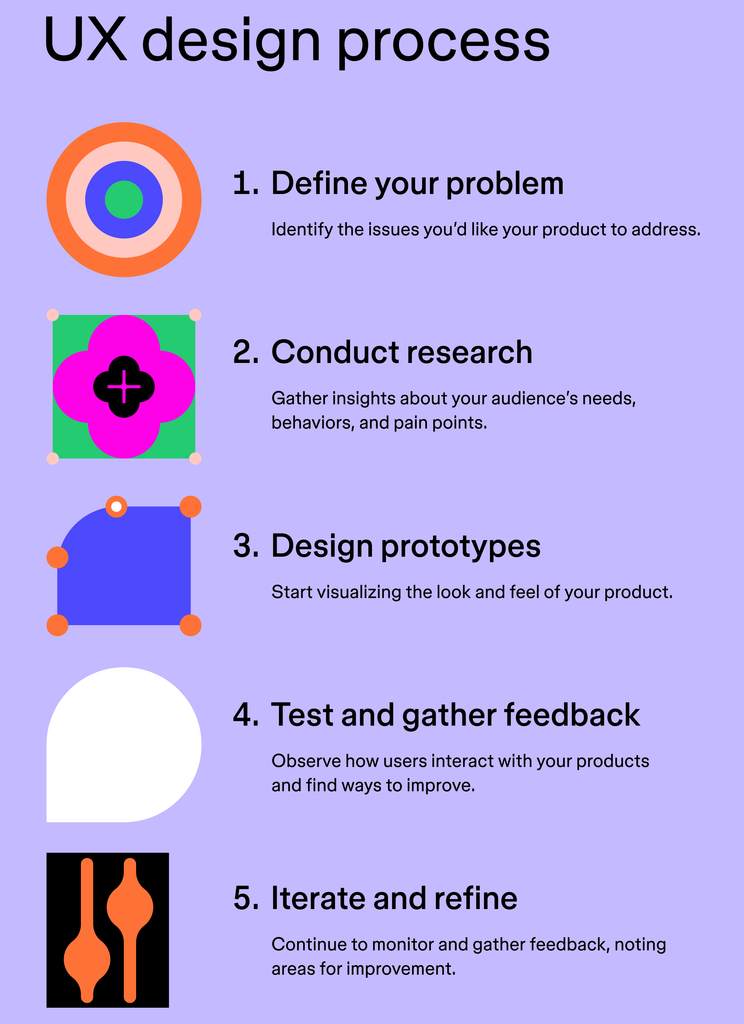
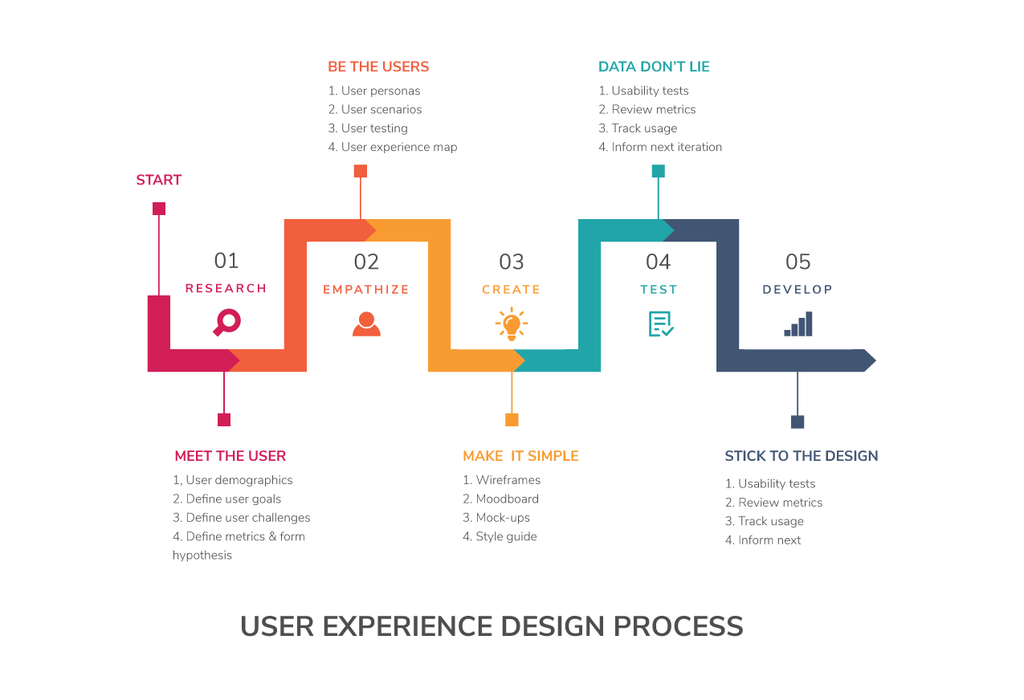
What is the UX Design Process?
There isn’t one universal UX process that every company follows. However, human-centred design commonly involves understanding users and their context, identifying requirements, creating design solutions, and evaluating those solutions.
A simple UX process looks like this:
Step 1: Research 🔎
First, understand the users.
Who are they?
What are they trying to accomplish?
What problems do they face?
Step 2: Define the Problem
Now turn the research into a clear problem statement.
For example:
“Students need a faster way to find beginner-friendly programming courses.”
That’s much more useful than simply saying, “Let’s build an education website.”
Step 3: Create Ideas
Now the UX team explores possible solutions.
There may be several ideas — and that’s okay.
At this stage, I wouldn’t immediately fall in love with the first idea. It may sound brilliant today and completely ridiculous after talking to five users tomorrow.
Step 4: Create Wireframes
A wireframe is a simple representation of a screen.
It usually focuses on:
- Layout
- Content placement
- Navigation
- Buttons
- Basic structure
It doesn’t need fancy colors or polished graphics.
Step 5: Build a Prototype
A prototype gives users something closer to the real experience.
For example, users may be able to click through a login process or shopping journey.
Step 6: Test With Users
This is where things get interesting.
Give the prototype to real users and observe what happens.
Don’t tell them exactly where to click.
Instead, give them a task:
“Try to purchase this product.”
Then watch.
Where do they hesitate?
What do they misunderstand?
Where do they click first?
These observations can reveal problems the design team never noticed.
Step 7: Improve and Repeat
UX isn’t usually:
Research → Design → Done.
It’s more like:
Research → Design → Test → Learn → Change → Test again.
That’s why iteration is so important in human-centred design.
Real-Life Example of Good UX
Let’s take a simple example: an ATM.
Imagine I want to withdraw ₹2,000.
A good ATM experience might look like this:
Insert card → Enter PIN → Select withdrawal → Enter amount → Confirm → Collect cash → Collect card
The system guides me through the process.
Now imagine the ATM displays five unrelated options with technical terms and no clear instructions.
I would probably stand there thinking:
“Okay… which button am I supposed to press?” 😅
The ATM doesn’t need to look spectacular.
It simply needs to help me accomplish my goal.
That is UX.
What Does a UX Designer Do?
A UX designer tries to understand users and create experiences that help them accomplish their goals.
Depending on the company, a UX designer may work on:
- User research
- Personas
- User journeys
- Wireframes
- Prototypes
- Information architecture
- Interaction design
- Usability testing
- Accessibility
- Collaboration with developers
- Collaboration with UI designers
- Design improvements
UX is also multidisciplinary. It can involve ideas from design, psychology, engineering, business, human factors, and research.
That’s one reason I find UX interesting.
You don’t have to think only like a designer.
You also need to think like a user.
UX Researcher vs UX Designer
These roles can overlap, especially in smaller companies.
UX Researcher
A UX researcher focuses heavily on understanding users.
They may conduct:
- Interviews
- Surveys
- Usability studies
- User observations
- Research analysis
UX Designer
A UX designer generally focuses more on turning user needs into product experiences.
They may create:
- User flows
- Wireframes
- Prototypes
- Interaction designs
- Information architecture
In a small organization, one person might handle several of these responsibilities.
What Skills Do You Need to Learn UX?
If you’re starting from zero, don’t panic.
You don’t need to become an expert in everything on day one.
I would start with:
- UX fundamentals
- User research
- Information architecture
- Wireframing
- Interaction design
- Usability testing
- Accessibility
- Prototyping
- Visual design basics
- Communication and problem-solving
Learning tools such as Figma can also help you create wireframes and prototypes.
But here’s something important:
Don’t spend all your time learning the tool.
A person can know every Figma feature and still create a terrible user experience.
The real skill is understanding why a design should work.
UX and Front-End Development
If you’re learning HTML, CSS, and JavaScript, UX knowledge can actually help you become a better front-end developer.
Why?
Because you aren’t only writing code.
You’re building something that people will use.
For example, knowing UX can help you think about:
- Responsive layouts
- Clear navigation
- Form usability
- Button placement
- Loading states
- Error messages
- Accessibility
- Mobile experiences
A developer who understands the user can make better implementation decisions.
If you’re learning front-end development, you may also want to explore [HTML basics], [CSS basics], and [JavaScript fundamentals] as supporting topics.
Common UX Mistakes Beginners Make
Here are a few mistakes I see people make when they first learn UX.
Designing for yourself
You are not always the user.
Your preferences may be completely different from your target audience.
Focusing only on appearance
A pretty interface isn’t automatically a good interface.
Ignoring mobile users
A design that works beautifully on a large desktop screen may become frustrating on a small phone.
Skipping user testing
You may think your design is obvious.
Your users might disagree within 30 seconds.
Ignoring accessibility
If people with different abilities cannot use your product, the experience isn’t truly inclusive.
Adding too many features
More features don’t automatically mean more value.
Sometimes the best UX decision is to remove something.
UX vs Usability vs UI
These three terms often get mixed together.
| Concept | Main Focus | Simple Example |
|---|---|---|
| UX | Overall experience | How the complete shopping journey feels |
| UI | Interface | Colors, buttons, typography, layout |
| Usability | Ease of use | How easily I can complete checkout |
They overlap, but they aren’t identical.
UX is the broader concept.
Why UX Matters in Today’s Digital World
We have more choices than ever.
If one app frustrates me, I can often find another.
That’s why companies cannot simply say:
“Our software works.”
Users don’t experience your source code.
They experience the product.
They experience the buttons.
They experience the loading time.
They experience the error messages.
They experience the checkout.
They experience how easy — or difficult — it is to accomplish something.
That entire journey contributes to what is User Experience (UX).
Final Thoughts
So, what is User Experience (UX)?
At its simplest, UX is the experience people have when they interact with a product, system, or service.
But I think the idea goes a little deeper.
Good UX starts with empathy.
Instead of asking:
“How can I make this look impressive?”
we ask:
“How can I make this easier for another person?”
That change in mindset can completely change the way we design websites, mobile apps, software, and services.
UX isn’t about guessing what users want. It’s about understanding them, designing for their needs, testing those designs, learning from mistakes, and improving the experience.
And honestly, that’s what makes UX so interesting.
A tiny change — moving a button, simplifying a sentence, removing one unnecessary step — can sometimes make a product dramatically easier to use. ❤️
If you’re beginning your journey in UX design, start small. Pick an app you use every day. Ask yourself:
- What works well?
- What annoys me?
- Why is this button here?
- Can I find what I need quickly?
- What would happen if I were using a screen reader?
- Can I complete my task without asking someone for help?
That’s UX thinking.
And once you start looking at everyday products this way, you may find yourself noticing UX everywhere.
Frequently Asked Questions
1. What is User Experience (UX) in simple words?
UX is how a person experiences and feels while using a product, website, app, or service.
2. Is UX the same as UI?
No. UI focuses mainly on the interface, while UX considers the broader experience of using the product.
3. Why is UX important?
UX helps make products easier to understand, use, access, and enjoy. Good UX can also reduce frustration and help users accomplish their goals more effectively.
4. What does a UX designer do?
A UX designer researches users, identifies problems, creates user flows and designs, develops prototypes, conducts testing, and improves the product experience.
5. Do I need coding skills to become a UX designer?
No. Coding isn’t a strict requirement for UX design. However, basic knowledge of HTML, CSS, JavaScript, and how software is built can be useful when collaborating with developers.
6. What tools are commonly used in UX design?
Design and prototyping tools such as Figma are commonly used, along with research, testing, documentation, and collaboration tools.
7. Is accessibility part of UX?
Yes. Accessibility is an important part of creating an inclusive experience. W3C explains that accessible websites and tools should allow people with disabilities to perceive, understand, navigate, and interact with them.
8. Where can I learn more about UX?
For reliable UX and human-centred design references, I recommend starting with the [Nielsen Norman Group UX resources] and the [ISO 9241-210 standard]. For accessibility, the [W3C Web Accessibility Initiative] is an excellent reference.
Want to learn more, Kaashiv Infotech Offers, UI UX Course, Front End Development Course, Full Stack Development Course & More, Visit Their Website www.kaashivinfotech.com.