In 2026, creating a professional product video is easier than many people expect. With an AI promo video maker, a short description, product photo, or simple campaign idea can become a polished video in minutes. You do not need a camera crew, expensive equipment, or advanced editing skills. AI can help you plan scenes, create visual content, and adapt your message for different platforms.
This guide explains how to create a promotional video for your product with AI, even if you are a beginner. It also shows how Pollo AI’s promo video maker can help you create videos in different styles for social media, advertising, and product marketing.

Why Use AI to Create a Product Promotional Video?
Traditional product videos can take days or weeks to produce. AI makes the process faster and more flexible. You can start with:
- A product image
- A short written description
- A reference style or mood
An AI promo video maker can turn these materials into a visual story. You can then create different versions for product launches, limited-time offers, social media campaigns, and online advertisements.
AI is especially useful when you need to test several ideas quickly. You can produce multiple variations and see which one gets the best response.
Start with a Clear Marketing Goal
Before generating a video, decide what you want it to achieve. A clear goal helps you write a better AI prompt. For example, instead of writing:
Make a video for my coffee machine.
Try:
Create a 20-second product promotional video for a compact coffee machine. Target busy office workers who want fresh coffee at home. Show the machine preparing coffee quickly in a modern kitchen. Highlight its small size and easy controls. End with the text: “Make better coffee in minutes. Shop now.”
This prompt gives the AI useful information about the audience, product benefits, setting, length, and call to action.
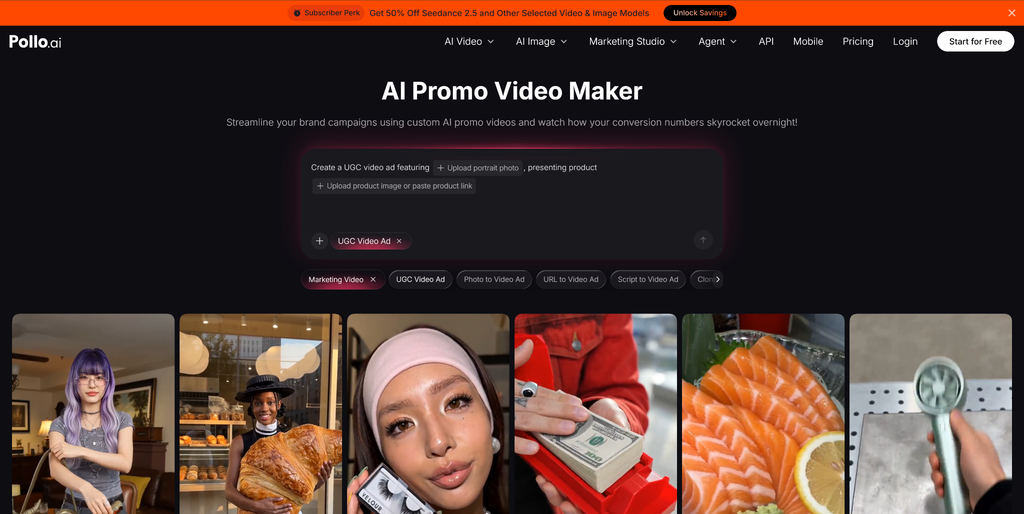
Use Pollo AI to Create Your Promo Video
Pollo AI’s promo video maker allows you to turn a product idea, description, or reference image into a promotional video. You can describe the scenes you want and choose settings that fit your campaign.
For a more accurate product presentation, upload a clear image of the product. A front-facing image with good lighting can help the generated video maintain important visual details. You can also explain how the product should appear, such as being placed on a desk, used outdoors, or shown in a close-up shot.
Pollo AI can also help you explore different creative directions. Depending on the purpose of your campaign, you can choose tools such as:
- Boomerang video maker – Useful for short, looping content that shows repeated movement or a simple product action.
- Tribute video maker – Suitable for emotional, memorable, or appreciation-focused videos.
- Meme video maker – A good option for playful, humorous, and highly shareable social media content.
- Realistic style video maker– Effective for product demonstrations and professional advertisements.
- 2D animation generator – Helpful for explainers, educational content, and colorful brand campaigns.
- 3D – Suitable for modern product visuals, technology, gaming, and creative presentations.
- Anime or fantasy – Useful when you want a distinctive style that stands out in a crowded feed.
The best style depends on your product and audience. A meme-style video may work well for a casual fashion brand, while a realistic or cinematic style may be more appropriate for skincare, electronics, or home products.
Build a Simple Promotional Video Structure
A strong AI product video should have a clear beginning, middle, and ending. You can use this structure for most short promotional videos.
1. Start with a hook
The opening should make people want to continue watching. You can begin with a question, a common problem, a surprising visual, or a strong product close-up.
Examples include:
- “Still wasting time on this every morning?”
- “Meet the small device that changes your daily routine.”
- “What if your bag could carry everything you need?”
- Start with the product in action.
Keep the opening short. Viewers on TikTok, Instagram Reels, and YouTube Shorts often scroll quickly.
2. Show the problem
Help viewers recognize a situation they experience. If you are promoting a portable charger, show someone with a nearly empty phone battery. This makes the product feel relevant.
3. Present the solution
Show how the product solves the problem. Use clear visuals and short text overlays. Avoid explaining every technical detail. Focus on the feature that creates the most value for the customer.
4. Add proof or a demonstration
A product demonstration can make the video more convincing. Show the product being used, compare the result before and after, or include a brief customer-style statement.
5. End with a call to action
Tell viewers what to do next. Examples include:
- Shop now
- Try it today
- Get 20% off
- Visit our website
- Start your free trial
A clear call to action is more useful than ending with only a logo.
Create Videos for Different Platforms
The same product can need different video versions for different platforms.
For Instagram and TikTok, use a vertical 9:16 format, fast pacing, captions, and a strong first few seconds.
For YouTube Shorts, keep the video vertical and make the product benefit clear early. A short voiceover and readable text can help viewers understand the message without sound.
For Instagram feed posts or X, square or landscape formats may work better in some placements. Keep important text away from the edges and make sure the product is visible on a small screen.
You should also create versions with and without music. Some users watch with the sound off, so captions and visual storytelling are important.
Test Multiple Ideas
Do not depend on one version. Create several videos by changing one element at a time. For example, you could make one realistic product demonstration, one meme-style video, and one emotional tribute-style video. Track views, watch time, clicks, comments, and sales to identify the strongest version.
Testing is one of the main advantages of using AI for promotional video creation. You can explore more ideas without adding the cost and time of a traditional production process.
Create Your Product Promo Video with Pollo AI
Creating a promotional video for your product with AI does not have to be complicated. Start with a clear goal, describe your audience and product benefit, choose a suitable style, and give the AI specific instructions. Whether you are launching a new product or testing a new campaign, Pollo AI can help you turn a simple idea into engaging promotional content more quickly and affordably.