ALOHA Protocol in Computer Networks Explained Simply is one of the easiest networking concepts I learned when I first started studying computer networks. At first, I thought it would be another complicated topic filled with technical terms. Surprisingly, it turned out to be a simple idea based on one question:
“What happens when two computers try to send data at the same time?”
If you’ve ever spoken at the exact same moment as your friend, both of you probably stopped, laughed, and tried again. That’s exactly how the ALOHA Protocol in Computer Networks Explained Simply works. Devices send data whenever they’re ready, and if two devices transmit together, they simply wait for a random amount of time before trying again.
In this guide, I’ll explain ALOHA Protocol in Computer Networks Explained Simply using everyday examples instead of confusing networking jargon. By the end, you’ll understand what it is, how it works, its types, advantages, disadvantages, and why it played such an important role in modern networking.
⭐ Key Highlights
- Learn ALOHA Protocol in Computer Networks Explained Simply using real-life examples.
- Understand why data collisions happen.
- Discover the two types of ALOHA Protocol.
- Compare Pure ALOHA and Slotted ALOHA.
- Learn the advantages and disadvantages.
- Understand where ALOHA is used today.
- Perfect for beginners, students, and interview preparation.
What is ALOHA Protocol in Computer Networks Explained Simply? 🌐
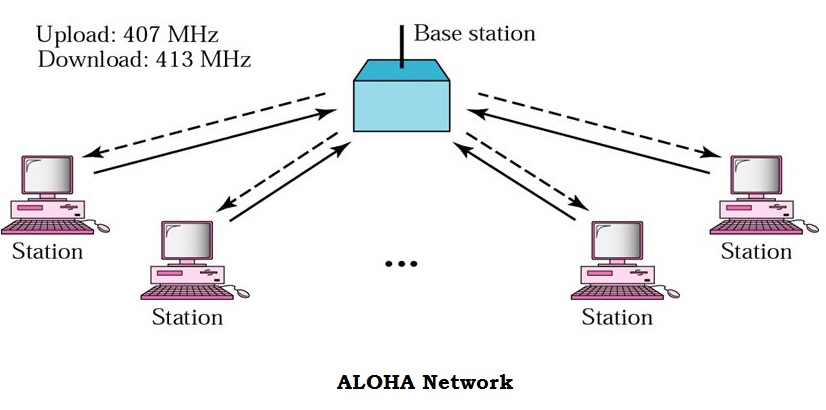
When I first heard the word ALOHA, I honestly thought it had something to do with Hawaii. Funny enough…it actually does!
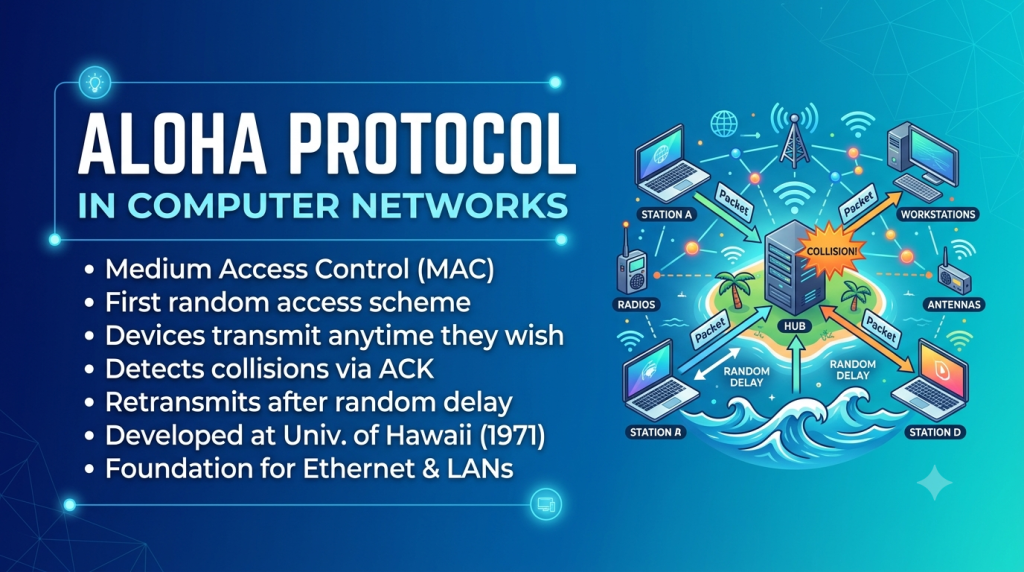
The protocol was first developed at the University of Hawaii to allow computers on different islands to communicate using radio signals.
In simple words,
ALOHA Protocol is a communication method that allows multiple computers to send data over the same communication channel without asking for permission first.
Every computer simply sends its data whenever it wants.
Sounds easy, right?
But here’s the catch…
Sometimes two computers send data at exactly the same time.
When that happens, their signals collide.
This is called a collision.
Both computers realize their data wasn’t received correctly.
Instead of giving up, they wait for a random amount of time and try again.
That’s the basic idea behind ALOHA Protocol in Computer Networks Explained Simply.
A Simple Real-Life Example 🎤
Imagine I’m in a classroom with ten students.
The teacher asks,
“Who completed the homework?”
Without raising our hands, everyone starts shouting…
“Me!”
Now nobody can understand anyone.
This is exactly like a collision in a computer network.
So what do we naturally do?
- Stop talking.
- Wait for a few seconds.
- Try speaking again.
Computers using the ALOHA Protocol behave in exactly the same way.
Why Was ALOHA Protocol Created?
Years ago, networking technology wasn’t as advanced as it is today.
The researchers at the University of Hawaii wanted computers on different islands to communicate through radio waves.
There wasn’t an easy way to control who should speak first.
Instead of creating a complicated system, they came up with a simple idea:
“Let every computer send data whenever it wants.”
If two devices happened to transmit together, they’d simply send the data again after waiting for a random amount of time.
This simple concept later inspired many modern networking technologies.
How Does ALOHA Protocol Work? ⚙️
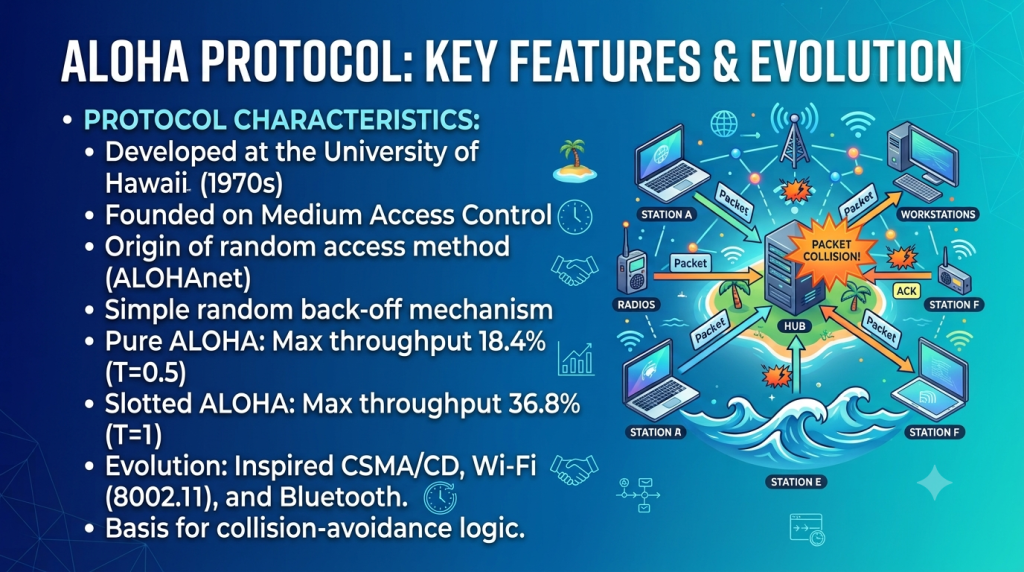
Let’s understand the process step by step.
Step 1: A computer has data to send
The moment a device has information ready, it immediately sends the data.
It doesn’t check whether another device is already transmitting.
Step 2: Data travels across the network
If no other device sends data at the same time…
✅ Success!
The receiver gets the message correctly.
Step 3: Collision occurs
Suppose another computer also starts transmitting.
Now both signals overlap.
Neither message can be understood.
This is called a collision.
Step 4: Devices wait
Both computers detect that something went wrong.
Instead of sending again immediately, they wait for different random time intervals.
Step 5: Retry
After waiting,
each computer sends the data again.
Eventually, one device transmits successfully.
Visualizing the Process
Think of a narrow bridge.
🚗 Car A starts crossing.
🚗 Car B also enters from the opposite side.
Now both cars block each other.
What happens?
One driver reverses.
The other passes first.
Then the first driver crosses.
That’s almost exactly how ALOHA Protocol in Computer Networks Explained Simply manages collisions.
Types of ALOHA Protocol
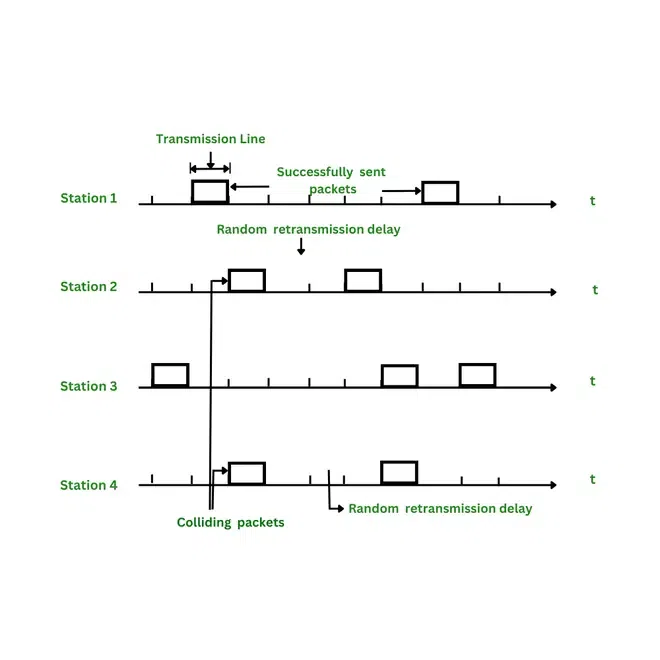
There are two main versions.
1. Pure ALOHA
Pure ALOHA is the simplest version.
Whenever a computer has data,
it sends it immediately.
No waiting.
No checking.
No fixed timing.
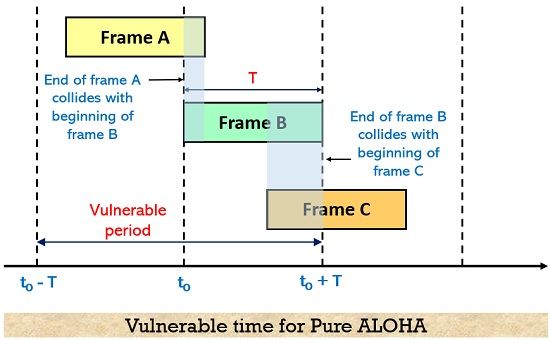
While this sounds convenient, it also creates many collisions because devices can transmit at any moment.
Characteristics of Pure ALOHA
- Very easy to implement.
- High chance of collisions.
- Lower efficiency.
- Random retransmission after collision.
2. Slotted ALOHA
Researchers later improved the original idea.
Instead of allowing devices to send data anytime,
they divided time into equal slots.
Now every computer must wait for the beginning of a slot before transmitting.
This simple improvement greatly reduced collisions.
Characteristics of Slotted ALOHA
- Data is sent only at fixed time slots.
- Fewer collisions.
- Better efficiency.
- Better channel utilization than Pure ALOHA.
Pure ALOHA vs Slotted ALOHA
| Feature | Pure ALOHA | Slotted ALOHA |
|---|---|---|
| Transmission Time | Anytime | Fixed Time Slots |
| Collision Chance | High | Lower |
| Efficiency | About 18% | About 37% |
| Synchronization Needed | No | Yes |
| Performance | Lower | Better |
When I compare the two, I like to think of Pure ALOHA as people entering a room whenever they want, while Slotted ALOHA is like everyone entering only when the bell rings. Waiting for specific moments reduces confusion.
Related Reads You Might Enjoy
Strengthen your understanding of networking, NAT, and related tech concepts with these insightful articles:
What is My IP Address? Discover Your Public IPv6 Address
Computer Network Introduction – Wikitechy
Types of Computer Networks – Wikitechy