10 Best Note-Taking Apps for iPad in 2025 – Perfect for Students & Professionals

Key Highlights:
- Best Note-Taking Apps for iPad in 2025 reviewed with features, pricing, and usability.
- Includes apps for students, professionals, and creatives.
- Covers both free and paid options.
- Find the perfect digital notebook for handwritten notes, PDFs, and cloud syncing.
- Internal and external links included for deeper insights.
Why You Need the Best Note-Taking Apps for iPad in 2025
Taking notes on an iPad has never been more efficient. Whether you’re a student, a professional, or someone who loves organizing ideas, the best note-taking apps for iPad in 2025 offer powerful features like handwriting recognition, PDF annotation, cloud syncing, and AI-assisted organization. In this guide, we’ll explore the 10 best note-taking apps for iPad that can transform the way you capture and manage information.
1. Notability – Best for Students & Handwritten Notes
Notability is one of the most popular best note-taking apps for iPad thanks to its handwriting, audio recording, and annotation tools. It’s perfect for students who want to record lectures while jotting down notes simultaneously.
Features:
- Handwriting and audio recording sync.
- PDF import and annotation.
- Cloud storage integration (Google Drive, Dropbox, iCloud).
- Presentation mode for collaboration.
2. GoodNotes 5 – Best for Handwritten Notes & Organization
GoodNotes 5 is a fantastic app for those who prefer handwritten notes. It allows searchable handwritten text, making it easier to find past notes.
Features:
- Handwriting-to-text conversion.
- Notebook-style organization.
- Annotate PDFs and images.
- Multi-device syncing via iCloud.

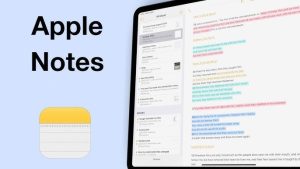
3. Apple Notes – Best Free Note-Taking App for iPad
Apple Notes comes pre-installed on every iPad and is a simple yet powerful app for quick notes.
Features:
- Free and easy to use.
- Syncs across all Apple devices.
- Supports handwritten notes, checklists, and attachments.
- Folders for better organization.
4. Evernote – Best for Professionals & Cross-Platform Syncing
Evernote remains a top note-taking app for iPad, offering powerful organization and AI search tools.
Features:
- Cross-platform sync (iPad, Windows, Mac, Android).
- Web clipper for saving online content.
- AI-powered search.
- Templates for meeting notes, to-do lists, and project planning.

5. OneNote – Best for Microsoft Users
If you’re a Microsoft user, OneNote is an excellent choice for seamless integration with Office apps.
Features:
- Completely free with Microsoft 365.
- Audio recording and handwriting support.
- Collaboration tools for teams.
- Cloud sync with OneDrive.
6. Nebo – Best for AI-Powered Handwriting Recognition
Nebo stands out for its AI-driven handwriting recognition, making it one of the smartest best note-taking apps for iPad in 2025.
Features:
- Converts handwritten notes into typed text.
- Supports math equations and diagrams.
- Syncs with iCloud, Dropbox, and Google Drive.
- Multi-language handwriting support.
7. Bear – Best for Writers & Markdown Users
Bear is perfect for those who love clean, distraction-free note-taking with Markdown support.
Features:
- Elegant UI with Markdown formatting.
- Tag-based organization.
- End-to-end encryption.
- Export notes as PDF, Word, or HTML.
🔗 Try Bear

8. Noteshelf – Best Alternative to GoodNotes
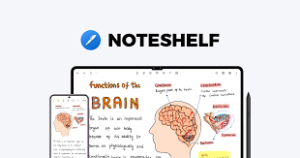
Noteshelf is a versatile note-taking app that offers both handwriting and audio recording.
Features:
- Supports Apple Pencil for precise writing.
- Annotate PDFs and images.
- Dark mode for late-night note-taking.
- Syncs with Dropbox, Google Drive, and OneDrive.
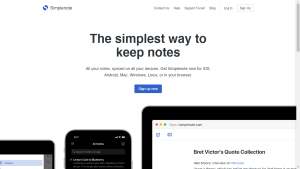
9. Simplenote – Best for Minimalists
If you prefer a lightweight, distraction-free experience, Simplenote is your best bet.
Features:
- Completely free with unlimited notes.
- Syncs across all platforms.
- Markdown support.
- Fast, responsive UI.
10. Whink – Best for Simplicity & Writing
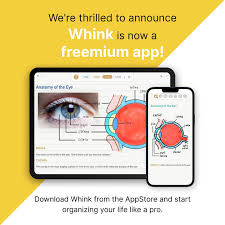
Whink is a beautifully designed note-taking app that focuses on smooth writing and minimalist design.
Features:
- Fluid handwriting experience.
- Supports typed text and PDF annotation.
- Easy document organization.
- iCloud backup support.
Final Thoughts: Which is the Best Note-Taking App for iPad in 2025?
Choosing the best note-taking app for iPad in 2025 depends on your needs:
- For Students: Notability, GoodNotes 5
- For Professionals: Evernote, OneNote
- For Writers: Bear, Apple Notes
- For AI Features: Nebo
Each of these apps helps boost productivity, enhance organization, and streamline note-taking. Try out a few and find the perfect fit for your workflow!
For more productivity apps, check out our guide on Best Free CRM Software for Small Business in 2025.
Do you have a favorite note-taking app? Let us know in the comments! 🚀