

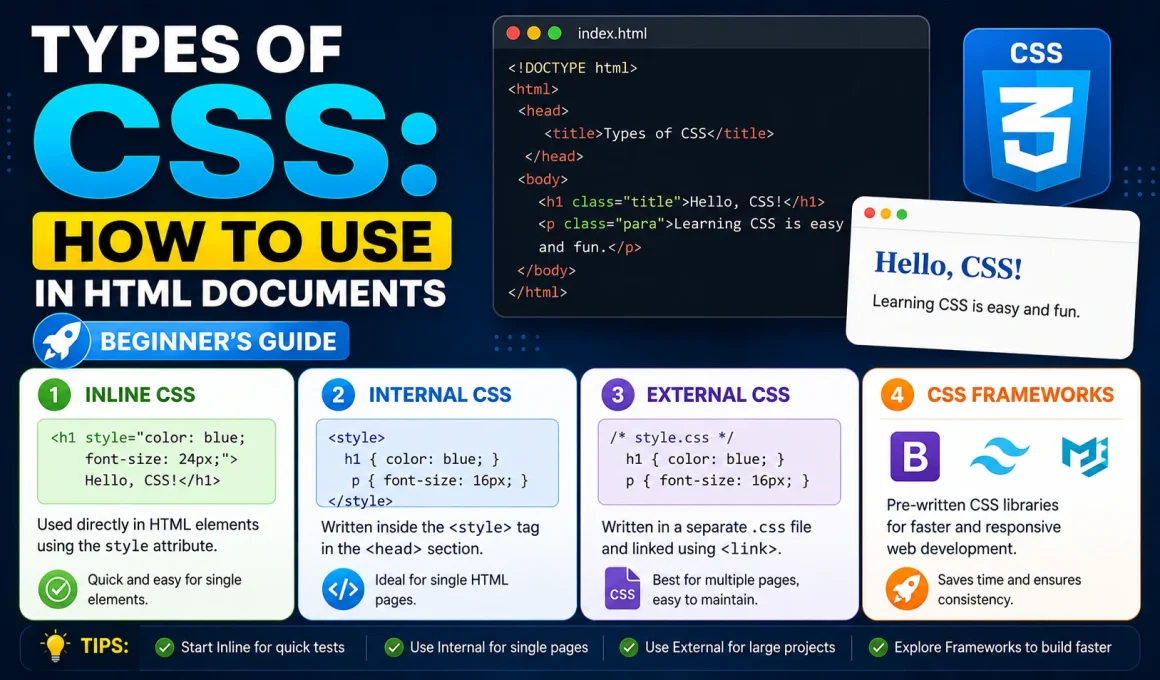
If you have ever looked at a website and admired its layout, beautiful typography, and smooth design, you are looking at the power of CSS. While HTML acts as the skeleton of your website, CSS (Cascading Style Sheets) is the skin, the style, and the personality.
However, for beginners, understanding how to actually apply that styling can be a bit confusing. Is there just one way to write CSS? Absolutely not.
In this guide, we will break down the Types Of CSS: How To Use In HTML Documents, exploring the three primary methods developers use to breathe life into their code. Whether you are building a simple landing page or a massive e-commerce platform, knowing these three methods is essential for your web development journey.
What is CSS (Cascading Style Sheets)?
Before we dive into the “types,” let’s have a quick refresher. CSS is a stylesheet language used to describe the presentation of a document written in HTML.
Think of it this way:
- HTML is the structure (The foundation, the walls, the roof).
- CSS is the design (The paint color, the wallpaper, the light fixtures).
Without CSS, the web would be a sea of plain, black-and-white text. CSS allows you to control colors, fonts, spacing, positioning, and even animations. But because different projects have different needs, CSS offers three distinct ways to be implemented.
Types Of CSS: How To Use In HTML Documents
The 3 Types of CSS
Based on how they are integrated into an HTML file, CSS is categorized into three major types:
- Inline CSS
- Internal (Embedded) CSS
- External CSS
Let’s look at each one in detail, including how to use them and when you should (or shouldn’t) reach for them.
1. Inline CSS
Inline CSS is the most “direct” way to style an element. As the name suggests, you write the styling inline—directly inside the HTML tag itself using the style attribute.
How to use Inline CSS
You apply it inside an HTML element like this:
HTML<h1 style="color: blue; text-align: center;">This is a Heading</h1>
Pros of Inline CSS
- Speed: It’s great for quick, one-off changes where you don’t want to touch an external stylesheet.
- Priority: Inline CSS has the highest specificity. It will override any external or internal styles applied to that element. This makes it a great “emergency” fix.
- No Dependency: You don’t need any other files. Everything is right there in the tag.
Cons of Inline CSS
- No Reusability: If you have 50 headings and want them all to be blue, you have to copy-paste the code 50 times. It’s a maintenance nightmare.
- Cluttered Code: It makes your HTML file look messy and bloated.
- Hard to Scale: As your website grows, using inline CSS will significantly increase your page file size, which can negatively impact performance.
2. Internal (Embedded) CSS
Internal CSS is defined in the <head> section of your HTML document. You use the <style> tag to contain all your CSS rules for that specific page.
How to use Internal CSS
Here is a quick example of how it looks in your document structure:
HTML<!DOCTYPE html>
<html>
<head>
    <style>
        body {
            background-color: lightblue;
        }
        h1 {
            color: navy;
            text-align: center;
        }
    </style>
</head>
<body>
    <h1>Welcome to My Website</h1>
</body>
</html>
Pros of Internal CSS
- Great for Single Pages: If you are creating a single-page website or a landing page, this is perfect. You don’t need to create extra files.
- No File Requests: Since the CSS is inside the HTML file, the browser doesn’t have to make an extra trip to the server to fetch a CSS file.
- Easy to Test: It’s convenient for beginners who are just starting to learn how styles affect elements.
Cons of Internal CSS
- Not Reusable: Just like inline CSS, these styles are stuck inside this specific page. You can’t use them on other pages without copy-pasting.
- Page Load Performance: If the styles get very long, they increase the overall size of your HTML document, which can slightly slow down initial loading.
3. External CSS
External CSS is the industry standard for professional web development. Here, you write your CSS in a completely separate file (usually named style.css) and link it to your HTML documents using the <link> tag.
How to use External CSS
First, create your CSS file (e.g., style.css):
CSS/* style.css */
body {
    background-color: lightgray;
}
h1 {
    color: darkblue;
}
Then, link it in the <head> of your HTML document:
HTML<head>
    <link rel="stylesheet" type="text/css" href="style.css">
</head>
Pros of External CSS
- Cleanliness: Your HTML file remains clean and strictly focused on content/structure.
- Reusability: One single CSS file can control the look of your entire website (10, 50, or 100 pages).
- Easy Maintenance: Want to change your website’s main font? Change it once in the
.cssfile, and it updates globally across your entire site. - Performance: Once the browser downloads the CSS file, it caches it. This means the browser doesn’t need to reload the styling every time the user clicks to a new page, making the site faster.
Cons of External CSS
- Extra Request: The browser has to fetch an extra file (the HTTP request), though this is negligible compared to the performance benefits of caching.
- Overkill for Simple Sites: If you are only creating a one-page “Hello World” site, an external file might feel like unnecessary work.
Which Type of CSS is Best?
If you are wondering, “Which one should I use?” the answer is almost always External CSS.
For professional development, External CSS is the gold standard. It provides the best separation of concerns: HTML handles the content, CSS handles the presentation. This makes your code readable, maintainable, and significantly more efficient for the browser to load.
Use Internal CSS if you are building a very simple, single-page site.
Use Inline CSS sparingly, only for quick, specific overrides where you need to force a style change on a single, isolated element.
Internal CSS Vs. Inline CSS Vs. External CSS: A Quick Comparison
To help you remember, here is a quick cheat sheet comparing the three:
| Feature | Inline CSS | Internal CSS | External CSS |
|---|---|---|---|
| Placement | Inside the HTML tag | In <head> section | In a separate file |
| Reusability | None | Limited (same page) | High (entire site) |
| Maintenance | Very Difficult | Moderate | Very Easy |
| Performance | Can slow down | Good | Best (Cached) |
| Best For | Emergency changes | Single-page sites | Large-scale projects |
Become A CSS / Front End Developer With Kaashiv Infotech
Looking to build a successful career in front-end development and create stunning, responsive web experiences? Kaashiv Infotech is here for you! Our Inplant Training (IPT) and specialized certification courses (including Python, Full Stack Development, and AI) are designed by industry experts to equip you with practical skills and real-world experience—helping you make a strong entry into the competitive front-end development industry.
Let’s break down our offerings to see what makes Kaashiv Infotech stand out:
- Diverse Live Industry Projects + Capstone: You’ll work on 2 real-time Live Industry Projects per internship, building a solid portfolio and enhancing your learning through hands-on capstone work that showcases your front-end skills in real business scenarios.
- Practice Exercises: Get hands-on practice with structured exercises that strengthen your learning, helping you master key front-end concepts like HTML5, CSS3, JavaScript, responsive design, and modern frameworks.
- Doubt Clearing Sessions: Our regular doubt sessions ensure that no question goes unanswered, giving you clarity on every concept as you progress through the training.
- Kaashiv Lab for Coding: Access our exclusive lab for coding practice and polish your front-end development skills in a supportive, real-world environment.
- Industry-Oriented Curriculum: Learn industry-relevant skills and techniques that are directly applicable to real-world projects—covering the latest trends, tools, and best practices used by leading companies.
- Training Led by Experts: Your training is led by Microsoft MVPs and Google-recognized experts, ensuring you learn from top professionals who bring deep industry knowledge and practical insights to every session.
- Triple Certification: Earn Kaashiv’s Triple Certification upon completion—Internship Certificate, IPT Certificate, and Industrial Exposure Certificate—recognized and valued by employers across the industry.
- Q&A Forum: Engage with fellow batchmates and instructors in our Q&A forum to exchange ideas, seek advice, and collaborate on projects.
- Instructor-Led Sessions: Benefit from interactive sessions led by experienced instructors who guide you every step of the way, from fundamentals to advanced front-end development techniques.
- Interview Opportunities: Gain access to interview opportunities and personalized career guidance to help you land your dream job as a CSS , Front End Developer.
- 100% Job Assistance + Career Support: We offer 100% Job Assistance, along with ATS-friendly resume tools and interview question banks to help you prepare confidently and stand out in today’s competitive hiring landscape.
So what are you waiting for? Launch your career with confidence! Join Kaashiv Infotech’s Inplant Training / Certification Program for CSS & Front End Development and unlock your potential today.
Conclusion
Understanding the types of CSS and how to use them in HTML documents is fundamental to your success as a web developer. While inline and internal CSS have their place in quick fixes or small projects, external CSS remains the undisputed king of web styling.
As you move forward, focus on keeping your code clean, modular, and efficient. Remember, the best websites aren’t just built; they are architected with care. Start applying external stylesheets to your projects today, and you will immediately notice the difference in how organized and professional your code becomes.
Types of CSS FAQs
Q1. What are the types of CSS in web development?
Ans: There are three major types of CSS: Inline CSS (applied directly to the element), Internal CSS (defined in the <head> of an HTML document), and External CSS (defined in a separate .css file linked to the HTML).
Q2. Why is external CSS considered the best?
Ans: External CSS is the best because it promotes reusability, keeps your HTML files clean and organized, and allows you to update the styling of your entire website from a single file. Plus, it improves site speed via browser caching.
Q3. Which CSS is the fastest?
Ans: External CSS is generally considered the “fastest” for multi-page websites. While it requires an initial download, browsers cache the file, meaning it doesn’t need to be reloaded as users navigate between pages.
Q4. Can I use multiple types of CSS at the same time?
Ans: Yes! You can use external, internal, and inline CSS simultaneously. However, browsers follow a hierarchy (Specificity): Inline CSS overrides Internal CSS, and Internal CSS overrides External CSS.
Q5. When should I use Inline CSS?
Ans: Inline CSS should be used sparingly. It is best reserved for quick, one-off style changes where you need to override existing global styles for a specific element without creating a new CSS class.
![Full Stack Developer Roadmap [2026]](https://www.wikitechy.com/wp-content/uploads/2026/06/Full-Stack-Developer-Roadmap-2026-380x220.png)