

What is Protocol ?
- Protocol is a special set of rules for communication data.
- Network protocol = Rules and conventions/conditions for communication between network devices.
- Network protocols defines the mechanism of devices to identify and establish the connections between each other + formatting rules that specify how data is packaged into messages sent and received.

What is MAC Address ?
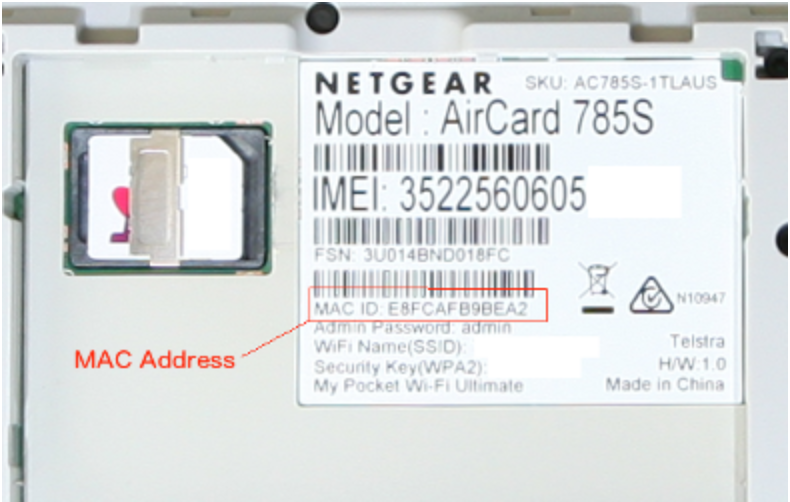
- A Media Access Control (MAC) address is a 48-bit address stored in the network Interface card.
- It is used for communication between two hosts in an Ethernet environment.
- It is nothing but a hardware /physical address of a computer.
- A MAC address is supposed to be globally unique and this will not be duplicated.
- The 48 bit contains – First 24 bits ( User ID -> Card Buyer ID ) + second 24 bits (card manufacturer)
- The address is written in the form of 12 hexadecimal digits. For example, consider the following MAC address:
- D8-D3-85-EB-12-E3

- Every hexadecimal character represents 4 bits, so the first six hexadecimal characters represent the vendor (in this case, Hewlett Packard).
Levels Of Addressing
- Four levels of addresses are used in an internet employing the TCP/IP protocols:
- Physical Addresses
- Logical Addresses
- Port Addresses
- Specific Addresses
To get MAC address
Option 1 :
- Click the Network Icon on Taskbar
- Click the connected network and click the properties which are shown in the figure

- The network setting window open and shows the mac address.

Option 2 :
- Open command prompt and type
getmacto get the mac address

Option 3 :
- Navigate to Control Panel > Network and Internet > Network Connections
- Right click the connection and click status within the dropdown

- Click Details buttons in the status window
- Then the Network Details windows open and shows the MAC address(Physical address)

Option 4 :
- Open command prompt and type ipconfig /all (have a gap between g and /).


