


Definition and Usage of Visibility Property :
The visibility property specifies whether or not an element is visible.
Table Of Content
Tip: Even invisible elements take up space on the page. Use the display property to create invisible elements that do not take up space!
| Default value: | visible |
| Inherited: | yes |
| Animatable: | yes. Read about animatable |
| Version: | CSS2 |
| JavaScript syntax: | object.style.visibility=”hidden” |
CSS Syntax :
[pastacode lang=”css” manual=”visibility%3A%20visible%7Chidden%7Ccollapse%7Cinitial%7Cinherit%3B%0A” message=”Css Code” highlight=”” provider=”manual”/]Property Values :
| Visible : | Default value. The element is visible |
| Hidden : | The element is invisible (but still takes up space) |
| Collapse : | Only for table elements. collapse removes a row or column, but it does not affect the table layout. The space taken up by the row or column will be available for other content.If collapse is used on other elements, it renders as “hidden” |
The display Property :
The display property specifies if/how an element is displayed.
Every HTML element has a default display value depending on what type of element it is. The default display value for most elements is block or inline.
Block-level Elements :
A block-level element always starts on a new line and takes up the full width available (stretches out to the left and right as far as it can).
The <div> element is a block-level element.
Examples of block-level elements:
<div>
<h1> – <h6>
<p>
<form>
<header>
<footer>
<section>
Display: none;
display: none; is commonly used with JavaScript to hide and show elements without deleting and recreating them. Take a look at our last example on this page if you want to know how this can be achieved.
The <script> element uses display: none; as default.
CSS Display/Visibility Properties :
| Property | Description |
| display | Specifies how an element should be displayed |
| visibility | Specifies whether or not an element should be visible |
CSS visibility: hidden vs. display: none
- At first glance it might seem like CSS’s display: none rule and it’s visibility: hidden rule have the exact same function, but that’s not entirely accurate. While it’s true that both rules render an HTML tag invisible, they do so in different ways.
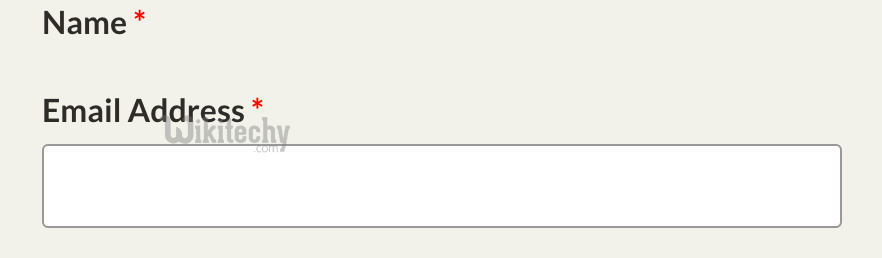
- Display: none completely strips an element from the page.
- This means that if you apply display: none to an element, it won’t appear on your website and there will be no visible evidence of it ever having existed — meaning that the surrounding elements will treat the element as empty space and adapt accordingly.
- Visibility: hidden simply hides an element from the page, while still rendering the tag in the viewport.
- This means that even though the element is invisible, there is still space allocated for it on the page, and the surrounding HTML elements will respect that space.
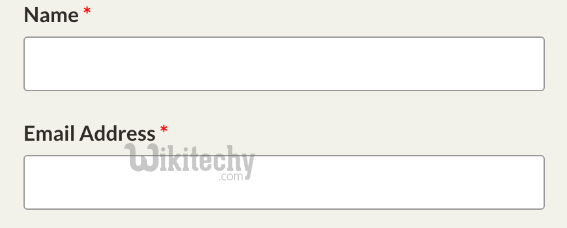
- These concepts are probably best explained visually. For an example, let’s use a standard contact form, like this one:
- If we set display: none to that first input field, it would look like this:
- If we set the input field to visibility: hidden, it would look like this:
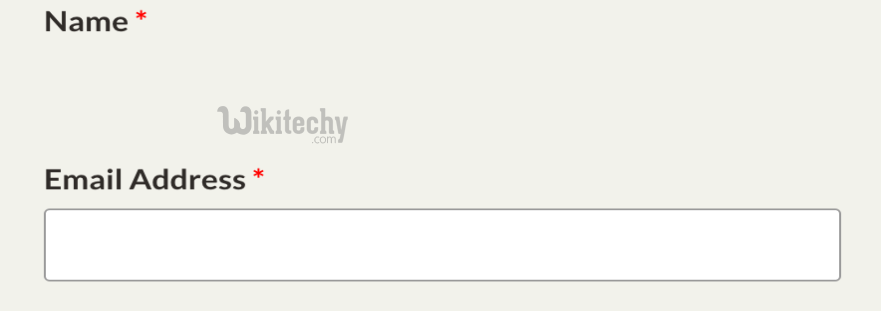
The difference here is pretty clear. Visibility: hidden hides the element from view while still allocating space for it on the page, while display: none makes the element entirely invisible and leaves no trace of it behind.
[ad type=”banner”]