


Maven
- Mavenis a powerful project management tool that is based on POM (project object model). It is used for projects build, dependency and documentation.
- It simplifies the build process like ANT. But it is too much advanced than ANT.
- Current version of Maven is 3.
A JAR (Java ARchive)
- JAR is a package file format typically used to aggregate many Java class files and associated metadata and resources (text, images, etc.) into one file for distribution.
TO CREATE A JAR FILE WITH MAVEN
Create a simple Java project
Table Of Content
- Maven
- A JAR (Java ARchive)
- TO CREATE A JAR FILE WITH MAVEN
- log4j.properties
- Make it support Eclipse.
- Update Pom.xml
- pom.xml
- Update App.java
- App.java
- Working with Dependencies
- How to add dependencies in a jar
- Solution
- pom.xml
- final Jar file
- Package
- List out the dateutils.jar content
- Run it
- Where is log4j.properties?
- Create a Java project from the Maven quick start template.
- The following files and folder structure will be created.
Above folder structure is not enough, create a log4j.properties file and put it in src/main/resources/log4j.properties, just create the resources folder manually.
log4j.properties
[pastacode lang=”java” manual=”%23%20Root%20logger%20option%0Alog4j.rootLogger%3DDEBUG%2C%20stdout%0A%0A%23%20Direct%20log%20messages%20to%20stdout%0Alog4j.appender.stdout%3Dorg.apache.log4j.ConsoleAppender%0Alog4j.appender.stdout.layout%3Dorg.apache.log4j.PatternLayout%0Alog4j.appender.stdout.layout.ConversionPattern%3D%25d%7BABSOLUTE%7D%20%255p%20%25c%7B1%7D%3A%25L%20-%20%25m%25n%0A” message=”java code” highlight=”” provider=”manual”/]Make it support Eclipse.
[pastacode lang=”java” manual=”%24%20mvn%20eclipse%3Aeclipse%0A” message=”java code” highlight=”” provider=”manual”/] [ad type=”banner”]Update Pom.xml
Update pom.xml to declare both log4j and the jodatime dependencies, for output to a jar format, make sure the packaging is set to “jar”.
pom.xml
[pastacode lang=”markup” manual=”%3Cproject%20xmlns%3D%22http%3A%2F%2Fmaven.apache.org%2FPOM%2F4.0.0%22%0A%09xmlns%3Axsi%3D%22http%3A%2F%2Fwww.w3.org%2F2001%2FXMLSchema-instance%22%0A%09xsi%3AschemaLocation%3D%22http%3A%2F%2Fmaven.apache.org%2FPOM%2F4.0.0%0A%09http%3A%2F%2Fmaven.apache.org%2Fmaven-v4_0_0.xsd%22%3E%0A%09%3CmodelVersion%3E4.0.0%3C%2FmodelVersion%3E%0A%09%3CgroupId%3Ecom.wikitechy.core.utils%3C%2FgroupId%3E%0A%09%3CartifactId%3EdateUtils%3C%2FartifactId%3E%0A%3C!–%20Output%20to%20jar%20format%20–%3E%0A%09%3Cpackaging%3Ejar%3C%2Fpackaging%3E%0A%0A%09%3Cversion%3E1.0-SNAPSHOT%3C%2Fversion%3E%0A%09%3Cname%3EdateUtils%3C%2Fname%3E%0A%09%3Curl%3Ehttp%3A%2F%2Fmaven.apache.org%3C%2Furl%3E%0A%3Cproperties%3E%0A%09%09%3Cjdk.version%3E1.7%3C%2Fjdk.version%3E%0A%09%09%3Cjodatime.version%3E2.5%3C%2Fjodatime.version%3E%0A%09%09%3Cjunit.version%3E4.11%3C%2Fjunit.version%3E%0A%09%09%3Clog4j.version%3E1.2.17%3C%2Flog4j.version%3E%0A%09%3C%2Fproperties%3E%0A%0A%09%3Cdependencies%3E%0A%09%09%3Cdependency%3E%0A%09%09%09%3CgroupId%3Ejunit%3C%2FgroupId%3E%0A%09%09%09%3CartifactId%3Ejunit%3C%2FartifactId%3E%0A%09%09%09%3Cversion%3E%24%7Bjunit.version%7D%3C%2Fversion%3E%0A%09%09%09%3Cscope%3Etest%3C%2Fscope%3E%0A%09%09%3C%2Fdependency%3E%0A%09%09%3Cdependency%3E%0A%09%09%09%3CgroupId%3Ejoda-time%3C%2FgroupId%3E%0A%09%09%09%3CartifactId%3Ejoda-time%3C%2FartifactId%3E%0A%09%09%09%3Cversion%3E%24%7Bjodatime.version%7D%3C%2Fversion%3E%0A%09%09%3C%2Fdependency%3E%0A%3Cdependency%3E%0A%09%09%09%3CgroupId%3Elog4j%3C%2FgroupId%3E%0A%09%09%09%3CartifactId%3Elog4j%3C%2FartifactId%3E%0A%09%09%09%3Cversion%3E%24%7Blog4j.version%7D%3C%2Fversion%3E%0A%09%09%3C%2Fdependency%3E%0A%09%3C%2Fdependencies%3E%0A%0A%09%3Cbuild%3E%0A%09%09%3CfinalName%3Edateutils%3C%2FfinalName%3E%0A%09%09%3Cplugins%3E%0A%0A%09%09%09%3C!–%20download%20source%20code%20in%20Eclipse%2C%20best%20practice%20–%3E%0A%09%09%09%3Cplugin%3E%0A%09%09%09%09%3CgroupId%3Eorg.apache.maven.plugins%3C%2FgroupId%3E%0A%09%09%09%09%3CartifactId%3Emaven-eclipse-plugin%3C%2FartifactId%3E%0A%09%09%09%09%3Cversion%3E2.9%3C%2Fversion%3E%0A%09%09%09%09%3Cconfiguration%3E%0A%09%09%09%09%09%3CdownloadSources%3Etrue%3C%2FdownloadSources%3E%0A%09%09%09%09%09%3CdownloadJavadocs%3Efalse%3C%2FdownloadJavadocs%3E%0A%09%09%09%09%3C%2Fconfiguration%3E%0A%09%09%09%3C%2Fplugin%3E%0A%3C!–%20Set%20a%20JDK%20compiler%20level%20–%3E%0A%09%09%09%3Cplugin%3E%0A%09%09%09%09%3CgroupId%3Eorg.apache.maven.plugins%3C%2FgroupId%3E%0A%09%09%09%09%3CartifactId%3Emaven-compiler-plugin%3C%2FartifactId%3E%0A%09%09%09%09%3Cversion%3E2.3.2%3C%2Fversion%3E%0A%09%09%09%09%3Cconfiguration%3E%0A%09%09%09%09%09%3Csource%3E%24%7Bjdk.version%7D%3C%2Fsource%3E%0A%09%09%09%09%09%3Ctarget%3E%24%7Bjdk.version%7D%3C%2Ftarget%3E%0A%09%09%09%09%3C%2Fconfiguration%3E%0A%09%09%09%3C%2Fplugin%3E%0A%0A%09%09%09%3C!–%20Make%20this%20jar%20executable%20–%3E%0A%09%09%09%3Cplugin%3E%0A%09%09%09%09%3CgroupId%3Eorg.apache.maven.plugins%3C%2FgroupId%3E%0A%09%09%09%09%3CartifactId%3Emaven-jar-plugin%3C%2FartifactId%3E%0A%09%09%09%09%3Cconfiguration%3E%0A%3C!–%20DO%20NOT%20include%20log4j.properties%20file%20in%20our%20Jar%20–%3E%0A%09%09%09%09%20%20%3Cexcludes%3E%0A%09%09%09%09%09%3Cexclude%3E**%2Flog4j.properties%3C%2Fexclude%3E%0A%09%09%09%09%20%20%3C%2Fexcludes%3E%0A%09%09%09%09%20%20%3Carchive%3E%0A%09%09%09%09%09%3Cmanifest%3E%0A%3C!–%20Jar%20file%20entry%20point%20–%3E%0A%09%09%09%09%09%09%3CmainClass%3Ecom.wikitechy.core.utils.App%3C%2FmainClass%3E%0A%09%09%09%09%09%3C%2Fmanifest%3E%0A%09%09%09%09%20%20%3C%2Farchive%3E%0A%09%09%09%09%3C%2Fconfiguration%3E%0A%09%09%09%3C%2Fplugin%3E%0A%0A%09%09%3C%2Fplugins%3E%0A%09%3C%2Fbuild%3E%0A%0A%3C%2Fproject%3E%0A” message=”html code” highlight=”” provider=”manual”/]Update App.java
App.java
[pastacode lang=”java” manual=”package%20com.wikitechy.core.utils%3B%0A%0Aimport%20org.apache.log4j.Logger%3B%0Aimport%20org.joda.time.LocalDate%3B%0A%0Apublic%20class%20App%20%0A%7B%0A%0A%09private%20static%20final%20Logger%20logger%20%3D%20Logger.getLogger(App.class)%3B%0A%0A%09public%20static%20void%20main(String%5B%5D%20args)%0A%20%7B%0A%09%09System.out.println(getLocalCurrentDate())%3B%0A%7D%0Aprivate%20static%20String%20getLocalCurrentDate()%20%7B%0A%0A%09%09if%20(logger.isDebugEnabled())%20%7B%0A%09%09%09logger.debug(%22getLocalCurrentDate()%20is%20executed!%22)%3B%0A%09%09%7D%0A%0A%09%09LocalDate%20date%20%3D%20new%20LocalDate()%3B%0A%09%09return%20date.toString()%3B%0A%0A%09%7D%0A%0A%7D%0A” message=”java code” highlight=”” provider=”manual”/]- Thus this project has two dependencies : log4j and jodatime.
Working with Dependencies
How to add dependencies in a jar
- we can put both log4j.jar and jodatime.jar inside the final.jar, but our classes are unable to call other classes which is inside the unpack log4j.jar, Java jar is designed like this, unless we can create a special class loader like one-jar plugin.
- Alternatively, use maven-assembly-plugin to extract all dependency jars into raw classes, and group it together.
- Try one-jar plugin, it will create a fat-jar, which includes the entire project’s dependencies into a single jar file.
Solution
- Copy the entire project’s dependencies to a pre-defined folder, and define the dependency class path in the jar’s manifest file.
- The updated and final pom.xml, to use maven-dependency-plugin to copy all dependencies to target/dependency-jars/ folder, and use maven-jar-plugin to add the dependency class path.
pom.xml
[pastacode lang=”markup” manual=”%3Cproject%20xmlns%3D%22http%3A%2F%2Fmaven.apache.org%2FPOM%2F4.0.0%22%0A%09xmlns%3Axsi%3D%22http%3A%2F%2Fwww.w3.org%2F2001%2FXMLSchema-instance%22%0A%09xsi%3AschemaLocation%3D%22http%3A%2F%2Fmaven.apache.org%2FPOM%2F4.0.0%0A%09http%3A%2F%2Fmaven.apache.org%2Fmaven-v4_0_0.xsd%22%3E%0A%09%3CmodelVersion%3E4.0.0%3C%2FmodelVersion%3E%0A%09%3CgroupId%3Ecom.wikitechy.core.utils%3C%2FgroupId%3E%0A%09%3CartifactId%3EdateUtils%3C%2FartifactId%3E%0A%09%3Cpackaging%3Ejar%3C%2Fpackaging%3E%0A%09%3Cversion%3E1.0-SNAPSHOT%3C%2Fversion%3E%0A%09%3Cname%3EdateUtils%3C%2Fname%3E%0A%09%3Curl%3Ehttp%3A%2F%2Fmaven.apache.org%3C%2Furl%3E%0A%3Cproperties%3E%0A%09%09%3Cjdk.version%3E1.7%3C%2Fjdk.version%3E%0A%09%09%3Cjodatime.version%3E2.5%3C%2Fjodatime.version%3E%0A%09%09%3Cjunit.version%3E4.11%3C%2Fjunit.version%3E%0A%09%09%3Clog4j.version%3E1.2.17%3C%2Flog4j.version%3E%0A%09%09%3C%2Fproperties%3E%0A%3Cdependencies%3E%0A%09%09%3Cdependency%3E%0A%09%09%09%3CgroupId%3Ejunit%3C%2FgroupId%3E%0A%09%09%09%3CartifactId%3Ejunit%3C%2FartifactId%3E%0A%09%09%09%3Cversion%3E%24%7Bjunit.version%7D%3C%2Fversion%3E%0A%09%09%09%3Cscope%3Etest%3C%2Fscope%3E%0A%09%09%3C%2Fdependency%3E%0A%09%09%3Cdependency%3E%0A%09%09%09%3CgroupId%3Ejoda-time%3C%2FgroupId%3E%0A%09%09%09%3CartifactId%3Ejoda-time%3C%2FartifactId%3E%0A%09%09%09%3Cversion%3E%24%7Bjodatime.version%7D%3C%2Fversion%3E%0A%09%09%3C%2Fdependency%3E%0A%3Cdependency%3E%0A%09%09%09%3CgroupId%3Elog4j%3C%2FgroupId%3E%0A%09%09%09%3CartifactId%3Elog4j%3C%2FartifactId%3E%0A%09%09%09%3Cversion%3E%24%7Blog4j.version%7D%3C%2Fversion%3E%0A%09%09%3C%2Fdependency%3E%0A%09%3C%2Fdependencies%3E%0A%0A%09%3Cbuild%3E%0A%09%09%3CfinalName%3Edateutils%3C%2FfinalName%3E%0A%09%09%3Cplugins%3E%0A%0A%09%09%09%3C!–%20download%20source%20code%20in%20Eclipse%2C%20best%20practice%20–%3E%0A%09%09%09%3Cplugin%3E%0A%09%09%09%09%3CgroupId%3Eorg.apache.maven.plugins%3C%2FgroupId%3E%0A%09%09%09%09%3CartifactId%3Emaven-eclipse-plugin%3C%2FartifactId%3E%0A%09%09%09%09%3Cversion%3E2.9%3C%2Fversion%3E%0A%09%09%09%09%3Cconfiguration%3E%0A%09%09%09%09%09%3CdownloadSources%3Etrue%3C%2FdownloadSources%3E%0A%09%09%09%09%09%3CdownloadJavadocs%3Efalse%3C%2FdownloadJavadocs%3E%0A%09%09%09%09%3C%2Fconfiguration%3E%0A%09%09%09%3C%2Fplugin%3E%0A%3Cdependency%3E%0A%09%09%09%3CgroupId%3Elog4j%3C%2FgroupId%3E%0A%09%09%09%3CartifactId%3Elog4j%3C%2FartifactId%3E%0A%09%09%09%3Cversion%3E%24%7Blog4j.version%7D%3C%2Fversion%3E%0A%09%09%3C%2Fdependency%3E%0A%09%3C%2Fdependencies%3E%0A%0A%09%3Cbuild%3E%0A%09%09%3CfinalName%3Edateutils%3C%2FfinalName%3E%0A%09%09%3Cplugins%3E%0A%0A%09%09%09%3C!–%20download%20source%20code%20in%20Eclipse%2C%20best%20practice%20–%3E%0A%09%09%09%3Cplugin%3E%0A%09%09%09%09%3CgroupId%3Eorg.apache.maven.plugins%3C%2FgroupId%3E%0A%09%09%09%09%3CartifactId%3Emaven-eclipse-plugin%3C%2FartifactId%3E%0A%09%09%09%09%3Cversion%3E2.9%3C%2Fversion%3E%0A%09%09%09%09%3Cconfiguration%3E%0A%09%09%09%09%09%3CdownloadSources%3Etrue%3C%2FdownloadSources%3E%0A%09%09%09%09%09%3CdownloadJavadocs%3Efalse%3C%2FdownloadJavadocs%3E%0A%09%09%09%09%3C%2Fconfiguration%3E%0A%09%09%09%3C%2Fplugin%3E%0A%3C!–%20Set%20a%20compiler%20level%20–%3E%0A%09%09%09%3Cplugin%3E%0A%09%09%09%09%3CgroupId%3Eorg.apache.maven.plugins%3C%2FgroupId%3E%0A%09%09%09%09%3CartifactId%3Emaven-compiler-plugin%3C%2FartifactId%3E%0A%09%09%09%09%3Cversion%3E2.3.2%3C%2Fversion%3E%0A%09%09%09%09%3Cconfiguration%3E%0A%09%09%09%09%09%3Csource%3E%24%7Bjdk.version%7D%3C%2Fsource%3E%0A%09%09%09%09%09%3Ctarget%3E%24%7Bjdk.version%7D%3C%2Ftarget%3E%0A%09%09%09%09%3C%2Fconfiguration%3E%0A%09%09%09%3C%2Fplugin%3E%0A%3C!–%20Make%20this%20jar%20executable%20–%3E%0A%09%09%09%3Cplugin%3E%0A%09%09%09%09%3CgroupId%3Eorg.apache.maven.plugins%3C%2FgroupId%3E%0A%09%09%09%09%3CartifactId%3Emaven-jar-plugin%3C%2FartifactId%3E%0A%09%09%09%09%3Cconfiguration%3E%0A%09%09%09%09%20%20%3Cexcludes%3E%0A%09%09%09%09%09%3Cexclude%3E**%2Flog4j.properties%3C%2Fexclude%3E%0A%09%09%09%09%20%20%3C%2Fexcludes%3E%0A%3Carchive%3E%0A%3Cmanifest%3E%0A%3CaddClasspath%3Etrue%3C%2FaddClasspath%3E%0A%3CmainClass%3Ecom.wikitechy.core.utils.App%3C%2FmainClass%3E%0A%3CclasspathPrefix%3Edependency-jars%2F%3C%2FclasspathPrefix%3E%0A%3C%2Fmanifest%3E%0A%3C%2Farchive%3E%0A%3C%2Fconfiguration%3E%0A%3C%2Fplugin%3E%0A%0A%3C!–%20Copy%20project%20dependency%20–%3E%0A%09%09%09%3Cplugin%3E%0A%09%09%09%09%3CgroupId%3Eorg.apache.maven.plugins%3C%2FgroupId%3E%0A%09%09%09%09%3CartifactId%3Emaven-dependency-plugin%3C%2FartifactId%3E%0A%09%09%09%09%3Cversion%3E2.5.1%3C%2Fversion%3E%0A%09%09%09%09%3Cexecutions%3E%0A%09%09%09%09%20%3Cexecution%3E%0A%3Cid%3Ecopy-dependencies%3C%2Fid%3E%0A%09%09%09%09%09%3Cphase%3Epackage%3C%2Fphase%3E%0A%09%09%09%09%09%3Cgoals%3E%0A%09%09%09%09%09%09%3Cgoal%3Ecopy-dependencies%3C%2Fgoal%3E%0A%09%09%09%09%09%3C%2Fgoals%3E%0A%09%09%09%09%09%3Cconfiguration%3E%0A%20%3C!–%20exclude%20junit%2C%20we%20need%20runtime%20dependency%20only%20–%3E%0A%09%09%09%3CincludeScope%3Eruntime%3C%2FincludeScope%3E%0A%09%09%09%3CoutputDirectory%3E%24%7Bproject.build.directory%7D%2Fdependency-jars%2F%3C%2FoutputDirectory%3E%0A%09%09%09%09%09%3C%2Fconfiguration%3E%0A%09%09%09%09%20%20%3C%2Fexecution%3E%0A%09%09%09%09%3C%2Fexecutions%3E%0A%09%09%09%3C%2Fplugin%3E%0A%0A%09%09%3C%2Fplugins%3E%0A%09%3C%2Fbuild%3E%0A%0A%3C%2Fproject%3E%0A” message=”html code” highlight=”” provider=”manual”/] [ad type=”banner”]final Jar file
Package
[pastacode lang=”javascript” manual=”%24%20mvn%20package%0A” message=”javascript code” highlight=”” provider=”manual”/]- Review the folder structure in the target folder
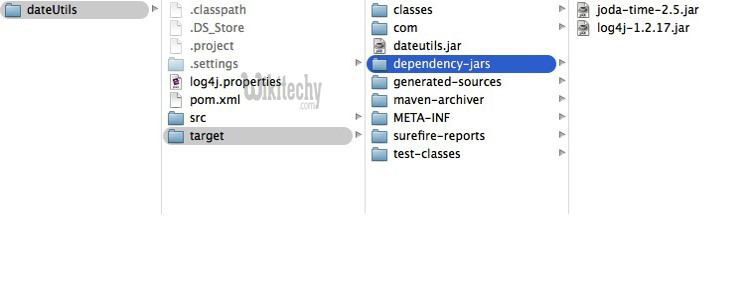
A dateutils.jar is created, and the entire project runtime dependencies (excluded junit) are copied to target/dependency-jars/ folder.
List out the dateutils.jar content :
[pastacode lang=”javascript” manual=”%24%20jar%20tf%20target%2Fdateutils.jar%0AMETA-INF%2F%0AMETA-INF%2FMANIFEST.MF%0Acom%2F%0Acom%2Fwikitechy%2F%0Acom%2Fwikitechy%2Fcore%2F%0Acom%2Fwikitechy%2Fcore%2Futils%2F%0Acom%2Fwikitechy%2Fcore%2Futils%2FApp.class%0AMETA-INF%2Fmaven%2F%0AMETA-INF%2Fmaven%2Fcom.wikitechy.core.utils%2F%0AMETA-INF%2Fmaven%2Fcom.wikitechy.core.utils%2FdateUtils%2F%0AMETA-INF%2Fmaven%2Fcom.wikitechy.core.utils%2FdateUtils%2Fpom.xml%0AMETA-INF%2Fmaven%2Fcom.wikitechy.core.utils%2FdateUtils%2Fpom.properties%0A%0A” message=”javascript code” highlight=”” provider=”manual”/]Extracts and review the content of MANIFEST.MF, the dependencies are added in the Class-Path.
[pastacode lang=”javascript” manual=”META_INF%2FMANIFEST.MF%0AManifest-Version%3A%201.0%0ABuilt-By%3A%20wikitechy%0ABuild-Jdk%3A%201.7.0_05%0AClass-Path%3A%20dependency-jars%2Fjoda-time-2.5.jar%20dependency-jars%2Flog4j-1.2.17.jar%0ACreated-By%3A%20Apache%20Maven%203.1.1%0AMain-Class%3A%20com.wikitechy.core.utils.App%0AArchiver-Version%3A%20Plexus%20Archiver%0A” message=”javascript code” highlight=”” provider=”manual”/] [ad type=”banner”]Run it
[pastacode lang=”javascript” manual=”%24%20java%20-jar%20target%2Fdateutils.jar%0A%0Alog4j%3AWARN%20No%20appenders%20could%20be%20found%20for%20logger%20(com.wikitechy.core.utils.App).%0Alog4j%3AWARN%20Please%20initialize%20the%20log4j%20system%20properly.%0Alog4j%3AWARN%20See%20http%3A%2F%2Flogging.apache.org%2Flog4j%2F1.2%2Ffaq.html%23noconfig%20for%20more%20info.%0A2014-10-19%0A” message=”javascript code” highlight=”” provider=”manual”/]Where is log4j.properties?
To exclude the log4j.properties in the jar file, to avoid issues like multiple log4j.properties files in classpath.
We can still pass in the log4j properties via the log4j.configuration system property like this :
[pastacode lang=”javascript” manual=”%24%20java%20-jar%20-Dlog4j.configuration%3Dfile%3A%2Ffull_path%2Flog4j.properties%20target%2Fdateutils.jar%0A%0A17%3A09%3A15%2C385%20DEBUG%20App%3A18%20-%20getLocalCurrentDate()%20is%20executed!%0A” message=”javascript code” highlight=”” provider=”manual”/]